
The Best 3D Printers on Kickstarter & Indiegogo
The words "3D printer" no longer point to one kind of machine. One printer on this page fits in your palm and runs off the same power bank that charges your phone. Another lays down continuous carbon fiber for a bracket strong enough to hold a car up. A third prints a figurine in ten million colors as it builds, finished the moment it leaves the plate, no paint, no brush. They are all called 3D printers, and they could hardly be more different. That is what makes desktop 3D printing so exciting right now, and so easy to get wrong, and the most interesting versions of each keep launching on Kickstarter and Indiegogo first.
That is the fun part and the problem at once. A resin printer and a nylon-sintering machine and a four-head color printer all get called a "3D printer," yet they make completely different things for completely different people. The best 3D printer is no longer the one with the strongest all-round spec sheet. It is the one built for the material, scale, and finish your work actually needs. Back the wrong one and you have an expensive paperweight. Back the right one and you have a tool that saves hours, replaces outsourced work, or earns its place in a working shop. This guide sorts the noise.
At GizmoCrowd we follow every serious 3D printer campaign as it launches, dig into the demos, read the backer updates, and separate the machines worth your money from the ones that render better than they print. Below you will find the best 3D printers we have covered, grouped by the technology inside them and the work they are built for, followed by a buying guide that walks through printer types, use cases, and budget. Whether this is your first 3D printer or a specialist tool joining a working shop, start here.
Not sure which technology fits what you want to make? Jump to the FDM vs resin vs SLS breakdown in the buying guide.
Last Updated: September 15, 2026
Best 3D Printers: Our Top Picks
No time to read the whole thing? Here is the shortcut. Nobody needs seven 3D printers, they need the right one, so instead of a single winner we have named the best pick for each kind of job. Scan the list, find the one that matches what you want to make, and follow it down to the full breakdown when you are ready.
If none of them fits perfectly, the buying guide further down will get you there.
Best for industrial and dual-material resin:
Anycubic P1 - engineering-grade resins a normal desktop printer can't touch.
Best portable resin printer:
TinyMaker - a real resin printer that fits in your hand and travels.
Best for functional and carbon-fiber parts:
FibreSeeker 3 - continuous carbon fiber for parts that carry real load.
Best multi-color printer:
LightMake L4 - four colors in one print with almost no waste.
Best desktop SLS printer:
Zongheng3D SLS1518 - support-free nylon parts, straight off a desktop.
Best full-color printer:
HeyGears G1 - full color and UV in one machine, no painting step.
Best full-color printer for AI models:
iNEW3D QC2A - turn a photo or a prompt into a colored print.
Each machine is reviewed in full below, with who it is really for and where it falls short.
Best Resin 3D Printers
Resin has a reputation for being the fiddly, messy corner of 3D printing, and that reputation is only half deserved.
A resin 3D printer builds objects by curing liquid resin with light, and in exchange for a slightly wetter workflow and smaller parts it holds detail no filament printer can match. If your work lives on fine features, miniatures, dental models, jewelry masters, or crisp prototypes, this is the technology that gets you there. The two below take resin in opposite directions: one chases industrial materials, the other pure portability.
Best Prosumer Resin 3D Printer
Anycubic P1 - From $599 · Shipping now
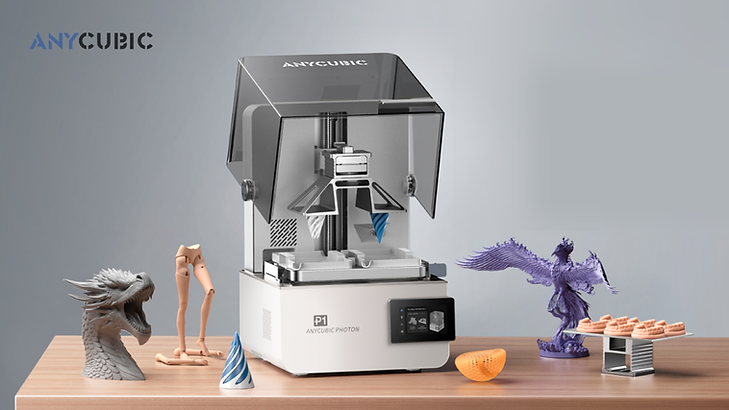
There is a ceiling most desktop resin printers hit fast: reach for a tougher engineering or dental resin, too thick for machines built around thin, standard resins, and the print peels off the plate halfway through. Clearing that ceiling is the whole reason the Anycubic P1 exists. It runs the thick, high-performance resins those machines choke on, which is what moves it out of hobby territory and into a tool you can build a business around.
That single capability changes who this printer is for. It opens up engineering resins, dental materials, and truly flexible composites that used to mean buying a machine ten times the price. It can also print two materials at once, so a model comes out with rigid and flexible sections already combined, or a miniature in two colors with no assembly. This is a tool for print farms, dental labs, and engineers who sell what they make, not a first printer for a casual hobby. Several of its best features, including the dual-material capability, are add-ons rather than included, which is the main thing to weigh. Our full review breaks down which configuration is actually worth it.
Why we picked it
Almost every affordable resin printer is locked to thin resins. The P1 is the rare one that runs industrial materials and prints two at once, and that combination is what earns it the prosumer slot for people who print to earn.
What we like
-
Runs tough engineering and dental resins cheaper machines simply can't
-
Prints two materials or two colors in a single job
-
Built for consistent, repeatable output across long production runs
-
Comes from an established maker with a real track record
Potential drawbacks
-
The signature dual-material feature is a paid add-on
-
Priced and built for professionals, not casual first-timers
-
The full resin workflow means gloves, washing, and curing
Best for
-
Print farms and studios producing resin parts at volume
-
Dental labs and engineers needing specialty materials
-
Makers who want dual-color or rigid-plus-flexible prints in one pass
Best Portable Resin 3D Printer
TinyMaker - From $129 - (late pledge) · Delivery December 2026

Every other resin printer needs an outlet, a vented corner, and a spot you are willing to lose for days. The TinyMaker fits in your hand and runs off a power bank, so it prints at a kitchen table, a craft fair, or a hotel room.
It is a genuinely tiny, fully open-source resin printer built around going anywhere. A sealed, gasketed resin tank keeps the spills and smell down, and it takes any standard resin rather than locking you into a cartridge. The build area is small, sized for miniatures, jewelry molds, and small parts rather than big models, and that limit is by design. What sets it apart from most crowdfunding printers is history: it originally funded years ago, and thousands of people across sixty-plus countries have backed it, with Batch 1 delivered and Batch 2 shipped. Our full review covers what it prints well and where the small build area bites.
Why we picked it
Most "mini" printers are just shrunk-down desktop units that still need a wall outlet. TinyMaker is built around being truly portable and open, with a real delivery record behind it, which makes it our pick for the smallest resin printer actually worth owning.
What we like
-
Small enough to travel and runs off a standard power bank
-
Fully open-source, with nothing locked down
-
Takes any standard resin, no proprietary cartridges
-
A real delivery record, unusual for a printer still funding
Potential drawbacks
-
Small build area, best for miniatures and small parts
-
The base tier is the printer only, with no wash or cure kit
-
Batch 3 is still in production with no committed ship date
Best for
-
Makers who want to print at events, markets, or on the road
-
Beginners after a low-cost, low-risk way into resin
-
Anyone with no room for a permanent resin setup
Best FDM 3D Printers
FDM is where most people start, and for good reason: it is the most forgiving, versatile corner of 3D printing.
An FDM 3D printer builds parts by laying down melted filament layer by layer, handles bigger parts than resin, runs a huge range of materials, and keeps a clean, dry workflow. If resin feels like a commitment, this is the easier door in. The two below show how far FDM now stretches: one prints parts strong enough for real engineering, the other prints in full multi-color with almost no waste.
Best 3D Printer for Functional and Carbon-Fiber Parts
FibreSeeker 3 - From $2,699 · Orders dispatched

A printed bracket can look flawless off a normal desktop printer and still snap the first time it takes a real load. That gap, between looking right and actually holding, is exactly where the FibreSeeker 3 works. It lays continuous carbon fiber inside the print, so the part holds, strong enough, in the campaign's own words, to hold up a car.
This is the difference between a prototype that shows a shape and a part you can bolt onto a machine and trust. Its parts reach roughly twice the strength of aluminum at half the weight, which puts a 3D printer for car parts, drone frames, robotic joints, and custom jigs on a desktop instead of at a machine shop. It comes from a team with an aerospace-composite background, and it can dial reinforcement up or down depending on whether you need speed or maximum strength. This is an engineering tool, not a first printer, and the fiber workflow asks more of you than a simple PLA machine. Our full review covers the materials it runs and the parts it genuinely replaces in metal.
Why we picked it
Plenty of printers call themselves engineering-grade. Continuous carbon fiber is what separates a part that survives from one that snaps, which is why the FibreSeeker 3 takes the functional-parts slot on this page.
What we like
-
Prints continuous carbon fiber for genuinely load-bearing parts
-
Reaches strengths a normal filament printer cannot approach
-
Tunable reinforcement, from fast drafts to maximum-strength parts
-
A large build area for full-size functional parts
Potential drawbacks
-
An engineering tool, priced and built for that, not for beginners
-
The fiber workflow has a real learning curve
-
More machine than a hobbyist printing display models needs
Best for
-
Engineers and product developers printing functional parts
-
Makers of drone frames, mounts, jigs, and bike components
-
Anyone who needs parts that survive real mechanical load
Best Multi-Color 3D Printer
LightMake L4 - From $1,299 - (Live campaign) · Estimated Delivery Nov 2026
.webp)
Multi-color printing on a normal printer comes with a hidden tax: the printer spends half the job purging filament to clear the nozzle between colors, one wasted blob at a time, and the print drags on for hours. The LightMake L4 was designed to end that. Each color gets its own dedicated head, so a color change takes about a second and wastes almost nothing.
That one idea changes the economics of color printing. As a multicolor 3D printer, the L4 avoids the repeated purges a single-nozzle machine needs: where a typical printer burns hundreds of grams of filament switching colors on a four-color model, the L4 wastes under a gram, and because all four heads work independently, it can also print four identical models at once. It is aimed at makers tired of running several single-color printers, and at small studios and print farms that want batch output from one box. As a first-time crowdfunding machine it has not shipped yet, and the campaign does not cite formal safety certification, which is the main thing to weigh. Our full review digs into the color workflow and who really needs four heads.
Why we picked it
Multi-color printing has always meant purge waste and slow swaps. The L4 removes both at once with four independent heads, which makes it the strongest batch-and-color option in the guide.
What we like
-
Four colors in one print with almost no wasted filament
-
Color changes in about a second instead of a slow purge
-
Prints four identical models at once for real batch output
-
Open-source software with AI-assisted setup
Potential drawbacks
-
A first-time crowdfunding machine that hasn't shipped yet
-
No third-party safety certification cited in the campaign
-
Expanding beyond four colors requires the paid FEDS add-on
Best for
-
Makers who run several single-color printers today
-
Small studios and print farms wanting batch output
-
Anyone who prints multi-color models regularly
Best Desktop SLS 3D Printer
SLS used to be something you rented time on, not something you owned: the expensive machine at a print service bureau, in a room you had to book.
Here is what it actually does. An SLS 3D printer fuses nylon powder with a laser, printing strong, complex, support-free parts that behave like production plastic, with no supports to cut off and no geometry off-limits, because the surrounding powder holds every layer. SLS has lived in industrial rooms for decades, and bringing it onto a desktop is exactly the kind of leap crowdfunding does best.
Best Desktop SLS 3D Printer
Zongheng3D SLS1518 - From $8,388 · Delayed Delivery

The obvious worry with any desktop SLS printer is whether it is real SLS or a watered-down version of it. The Zongheng3D SLS1518 answers that directly. It brings genuine powder-bed printing down to a desktop and ships with its own post-processing station, so you get true SLS parts without a factory floor, and without being left to handle loose powder by hand.
This is the machine for anyone who needs the specific strengths of SLS: durable nylon parts and complex, interlocking shapes printed in a single go, with no supports to remove. That makes it a genuinely different tool from everything else here, aimed at functional prototypes, small production runs, and parts that have to survive real use. It comes from a company with years of industrial SLS behind it, and it arrives certified and filtered enough to run in an office or workshop. It is a serious, premium tool with a powder workflow a filament user will need to learn, and it takes up real space. Our full review covers the powder handling and who actually needs SLS over FDM.
Why we picked it
Desktop SLS is still rare, and it unlocks parts neither resin nor filament can make. The SLS1518 brings that whole process, printer and post-processing together, onto a desktop. For desktop nylon production, it occupies a category of its own.
What we like
-
Prints strong, support-free nylon parts on a desktop
-
Handles complex, interlocking geometry in one build
-
Ships with its own enclosed powder-handling station
-
Certified and filtered enough for an office or workshop
Potential drawbacks
-
A premium price and a real footprint
-
A powder workflow filament users will need to learn
-
Its original delivery estimate has passed without a newer fulfillment update
Best for
-
Engineers and small teams needing functional nylon parts
-
Anyone printing complex geometry without supports
-
Small production runs and durable prototypes
Best Full-Color 3D Printers
The painting is the part most people underestimate: hours of sanding, priming, and brushwork after the print is already done. Full-color printing removes that whole step.
A full-color 3D printer finishes a model in color as it builds, instead of handing you a plain object to paint. It is the youngest and hardest corner of desktop printing, which is exactly why these two machines earn attention. Both build the color into the print itself, just from different directions: one folds in flatbed UV and texture, the other turns a photo or a prompt into a colored model.
Best Full-Color 3D Printer
HeyGears G1 - From $1,999 and $3,599 for the full-color 3D configuration - (Late pledge) · Delivery Mar 2027

Most machines on this page do one thing well. The HeyGears G1 does three, printing in ten million colors, adding 3D texture, and running flat UV jobs from one chassis. The color is the headline: it builds into the model as it prints, so the painting step other machines leave to you simply disappears.
It is the most versatile machine in the guide. One chassis covers full-color 3D printing, 3D texture, and flat 2D UV printing, so the same machine finishes a color figurine, an embossed surface, and a printed panel without swapping to another tool. For a studio that sells what it prints, whether that is figurines, personalized phone cases, or short-run prototypes, it collapses a shelf of separate machines and the whole painting step into one box. It is a heavy, premium machine, and full-color 3D printing is an upgrade on the entry configuration rather than included on every tier, which is the thing to check before buying. Our full review breaks down each mode and which tier actually makes sense.
Why we picked it
Full color is the hardest thing to do well on a desktop, and the G1 does it while folding in texture and UV printing too. That range, behind one of the biggest 3D printing campaigns we have tracked, is why it takes the full-color slot.
What we like
-
Builds full color into the model, no painting step
-
Adds 3D texture and flat 2D UV printing in the same machine
-
Replaces several single-purpose machines for a studio
-
Turns a text prompt or photo into a printable file
Potential drawbacks
-
A heavy, premium machine that needs a dedicated bench
-
The $1,999 entry tier does not include full-color 3D printing
-
A newer platform, so the ecosystem is still growing
Best for
-
Studios that sell figurines, models, or personalized goods
-
Makers who want color, texture, and flat UV in one machine
-
Anyone tired of hand-painting every print
Best Full-Color Printer for AI-Generated Models
iNEW3D QC2A - From $7,199 · Delayed Delivery

Turning an idea into a colored print normally means learning CAD, then learning to paint. The iNEW3D QC2A skips both: it generates a 3D model from a photo or a text prompt, then prints it in over half a million colors, leaving only the water-soluble supports to rinse away and no painting at all.
Color is jetted straight into the model as it prints, with smooth gradients and even transparent sections, so a display piece or figurine needs no painting and no assembly. The AI modeling is built right into its software, which lowers the barrier for creators who have the idea but not the 3D skills, and the water-soluble supports simply dissolve in water. It is a premium, purpose-built machine aimed at studios producing colored figurines, collectibles, and prototypes for sale, where losing the painting step pays for itself. It is a first-generation product in a demanding category, so it carries early-adopter risk. Our full review covers the color quality and the production math.
Why we picked it
Most color printers still assume you can model in CAD. The QC2A pairs true full-color printing with built-in AI modeling, and it is the better fit when the work starts from a photo or a prompt rather than a CAD file.
What we like
-
Builds over 500,000 colors into the model, no painting
-
Generates printable 3D models from a photo or text prompt
-
Water-soluble supports dissolve away with no cleanup tools
-
Built for short-run batches of colored figurines and collectibles
Potential drawbacks
-
A premium price aimed at working studios
-
A first-generation machine in a demanding category
-
Ongoing resin and material costs to factor in
Best for
-
Figurine, collectible, and prototype studios
-
Creators who want color without CAD skills
-
Small businesses selling colored prints
Discover the Best Kickstarter Projects Before Everyone Else
Handpicked launches, standout products and early-bird deals. Straight to your inbox.
How We Chose the Best 3D Printers
Our picks are not about the biggest build volume or the flashiest render. They come from weighing each machine against what actually decides whether a 3D printer performs for the work you buy it for.
Print technology matched to the job. Resin, FDM, SLS, and full-color are different tools for different work, and the technology matters far more than any single spec. We weigh the type against what you are trying to make first.
Real part quality. What each machine genuinely resolves or how strong its parts actually are, judged from print demos and delivered results rather than the best-case sample in a campaign photo.
The work it is built for. A miniatures printer and an engineering printer want completely different things, so we judge each machine against its intended use, not a universal checklist.
Workflow and ease of use. Resin washing, SLS powder handling, and open versus locked software all shape daily life with a printer, and we favor machines honest about what their workflow demands.
Real cost in working trim. Resin kits, add-on modules, powder, and spare plates add up. We weigh the working configuration, not just the headline entry price.
Delivery record and creator history. Whether the team has fulfilled campaigns before, and whether this machine has actually shipped, weighs as heavily as the specs.
Level of independent evidence. We weigh demonstrations, fulfillment records, owner experience, and the maturity of the product alongside the manufacturer's published specifications.
How to Choose the Right 3D Printer
Which type is right for you: FDM vs resin vs SLS
The main types of 3D printers covered here are FDM, resin, SLS, and full-color systems, and the single most important choice is which one you buy, because it decides what you can make. FDM prints melted filament in layers: versatile, affordable, and great for functional parts and larger prints, with visible layer lines. Resin cures liquid with light for far finer detail, ideal for miniatures and jewelry, at the cost of a wetter workflow and smaller parts. SLS fuses nylon powder into strong, support-free parts and sits at the top for engineering work. Weighing FDM vs resin comes down to size and versatility against fine detail; weighing SLS vs FDM comes down to production-grade nylon against everyday flexibility. Pick the technology first, then compare machines within it.
Best 3D printer for miniatures and tabletop
Miniatures are a detail problem first, and that points to resin. A 3D printer for miniatures needs to resolve fine features cleanly and repeat them across a full plate, whether that is Warhammer-style armies, D&D characters, or display busts where facial and surface detail matter. That is where a resin machine like the Anycubic P1 earns its place, and its dual-color option even prints two-tone figures without painting. For printing at events or on a budget, the compact TinyMaker handles miniatures and small parts at a fraction of the size. FDM can print larger terrain and props, but for the figures themselves, resin detail is what sells.
Best 3D printer for cosplay and props
Cosplay covers two different jobs, and the right 3D printer for cosplay depends on which you are doing. For large armor and props, an FDM machine gives you the build size and tough, sandable parts. For small detailed accessories and insignia, resin detail wins. Many cosplayers end up wanting both, printing shells on FDM and fine detail on resin. Match the machine to the scale of the piece, and expect serious prop work to eventually pull you toward two printers.
Best 3D printer for functional and engineering parts
When a part has to carry load or replace metal, the technology matters more than anywhere else. A 3D printer for car parts, tooling, jigs, or drone frames needs real mechanical strength, which is where continuous carbon fiber comes in. The FibreSeeker 3 is built for exactly that, printing parts that reach roughly twice the strength of aluminum at half the weight. If you print functional nylon parts, an SLS machine like the Zongheng3D SLS1518 is the other strong answer, since sintered nylon survives real use. Do not ask a standard hobby printer to do this job.
Best 3D printer for jewelry
Jewelry is a precision and casting problem, and a 3D printer for jewelry almost always means resin. The fine resolution captures the detail a piece needs, and castable resins let jewelers print masters for lost-wax casting directly. A capable resin machine like the Anycubic P1 handles the detail and the specialty materials; for colored display pieces, the full-color machines below add another dimension. At this scale, precision matters far more than build size.
Best 3D printer for beginners
The best 3D printer for beginners is the one that gets you printing without a big upfront risk or a permanent corner of the house. A compact, low-cost, easy machine beats an ambitious one you are afraid to touch. The TinyMaker is a genuinely low-risk way into resin, small and cheap enough to learn on and portable enough to put away. Start on something forgiving, learn what you actually want to make, and upgrade toward engineering strength or full color once you know which limit you have hit.
Best 3D printer under $500
You do not need to spend four figures to make real things. The best 3D printer under $500 depends on what you want to make: an entry resin printer like the TinyMaker for detailed small parts, or an entry FDM machine for versatility and larger prints. The real trade at this price is build size and material range, not whether the machine works. Buy the affordable printer to learn the craft, and step up only once you know the specific limit you have outgrown.
Multi-color and full-color printing options
Color splits into two very different approaches. A multicolor 3D printer like the LightMake L4 loads several filament colors and switches between them, ideal for bold, distinct-color models and batch runs. A full-color 3D printer like the HeyGears G1 or the iNEW3D QC2A builds continuous, photo-real color into the model itself, which is what figurines and display pieces need. If you want a few clean colors and versatility, multi-color FDM is the pick; if you want lifelike, painted-looking output straight off the plate, full color is the technology to look for.
Red Flags to Watch for in 3D Printer Campaigns
After reviewing many crowdfunding hardware campaigns, certain patterns signal trouble before a unit ships.
Renders instead of real print footage. A serious campaign shows the machine printing actual parts, at stated speeds, in the materials you care about. Beauty renders prove nothing about how it prints.
Sample prints with no settings behind them. A flawless hero model means little without the material and time behind it. Honest campaigns show the working details, not just the trophy shot.
Vague material claims. "Prints engineering materials" is not a spec. Look for the actual filaments, resins, or powders a machine runs, and demos in those materials specifically.
First-time team with an ambitious timeline. Hardware is hard. A first-time creator promising delivery within a few months needs to show that tooling, suppliers, and production validation are already well advanced. Check whether the team has fulfilled campaigns before.
Locked software or consumables. A machine tied to one vendor's app or forced into proprietary resin or powder is a long-term risk. Open workflows and standard materials protect you if the company stumbles.
How GizmoCrowd Evaluates 3D Printers
We compare campaign claims with available print demonstrations, delivery records, and owner feedback, and we identify where independent verification is still limited. Where machines have shipped in volume, we factor in the post-launch experience documented across forums, Reddit, and active maker communities.
We look at build quality from available evidence, stated specifications against community-reported results, material and software ecosystem quality, and the long-term viability of the manufacturer as a support resource.
Commercial relationships do not determine our verdicts or guarantee positive coverage. Any sponsored placement or affiliate relationship is disclosed.
Buying for a working studio? Our guide to the best 3D printers for small businesses compares machines built around production, customization, and products for sale.
Prefer to cut and shape material rather than build it up layer by layer? Our best CNC machines guide covers desktop routers, mills, and lathes with the same crowdfunding-first approach. And if you would rather engrave, mark, or cut with light, our best laser engravers and cutters guide covers diode, CO2, fiber, and UV machines.