


Best Fabrication Tools for Makers on Kickstarter & Indiegogo
The desktop fabrication tools market has changed faster in the last five years than in the previous two decades. Machines that used to live exclusively in professional machine shops are now sitting on garage workbenches. Precision CNC mills, fiber laser engravers, continuous fiber 3D printers. And the most interesting ones don't come from established manufacturers. They come from independent engineering teams who launch on crowdfunding platforms first.
At GizmoCrowd, we track every major fabrication tool campaign across Kickstarter and Indiegogo. We dig into the specs, pressure-test the marketing claims, and focus on one thing above everything else: real workshop usability. The goal is to help you find the machine worth your money before you commit to it.
Whether you're setting up your first maker workshop or adding a serious machine to an existing setup, this is your starting point.
Last Updated: September 15, 2026
On this page:
-
Why Makers Are Turning to Crowdfunding for Fabrication Tools
-
CNC Machines - Precision Cutting & Milling for Your Workshop
-
Laser Engravers & Cutters - Create, Personalize and Cut with Precision
-
3D Printers - From Rapid Prototyping to Production-Ready Parts
-
All-in-One Fabrication Machines - CNC, Laser & 3D Printing in One
Why Makers Are Turning to Crowdfunding for Fabrication Tools
There's a reason the most interesting fabrication machines of the last five years didn't launch at CES or through major retail channels. They came through crowdfunding.
Independent hardware development changed the economics of bringing a machine to market. A small engineering team with a genuinely better idea can now bring that machine directly to the people who need it. A more rigid CNC chassis, a smarter laser alignment system, a composite 3D printer that costs a fraction of industrial alternatives. No distributor markups. No compromise for mass-market appeal.
The result is a catalog of fabrication innovation that established manufacturers haven't matched. The Snapmaker brought modular 3-in-1 fabrication to makers who couldn't justify three separate machines. The NestWorks C500 put industrial-grade spindle power into a desktop footprint. The FibreSeeker 3 made continuous carbon fiber printing accessible outside aerospace R&D labs. What was once called digital fabrication and reserved for university fab labs is now accessible to anyone with a workbench and a budget.
What's changed most in the last few years isn't the ambition of the campaigns. It's the accountability. Early crowdfunding hardware was a gamble. Missed deadlines, underperforming prototypes, and campaigns that disappeared with backer money were common enough to give the whole model a bad reputation. That reputation has largely been replaced by something more mature. Creators who have shipped once know what they didn't know the first time. Backers are more demanding, more technical, and quicker to call out spec sheet exaggeration in the comments section.
The campaigns that reach GizmoCrowd's review queue tend to be the ones that have already survived that scrutiny. Machines with working prototypes, engineering teams with track records, and specs that hold up when you start asking uncomfortable questions. Not all of them deliver perfectly. But the category has earned a level of credibility it didn't have five years ago.
Crowdfunding fabrication tools still carries real risk. Not every campaign delivers. Not every spec sheet reflects real-world performance. Once a campaign closes, your money is committed. That's the problem GizmoCrowd exists to solve.
This is where GizmoCrowd comes to the rescue!
CNC Machines - Precision Cutting & Milling for Your Workshop
What Is a CNC Machine and Who Is It For?
A CNC machine moves a rotating cutter through programmed paths to remove material from a block. Feed it a digital design and it reproduces that design in wood, aluminum, acrylic, brass, or a dozen other materials with accuracy that hand tools can't touch.
The desktop CNC market breaks into three categories worth understanding before you look at a single campaign.
CNC Routers are the most common. They use a spinning bit to carve material from above, moving across a flat work surface. Wood, MDF, soft plastics, and light aluminum all fall within their range. Making furniture components, custom signs, enclosures, or decorative panels, a router covers that ground well.
CNC Mills are built for harder materials. Where a router flexes under sustained load, a proper mill holds tight tolerances across metal. That difference shows up the first time you try cutting aluminum with the wrong machine: chatter, poor surface finish, a spindle working twice as hard for half the result. Desktop mills like the NestWorks C500 bring real machining capability to a workshop that doesn't have room for industrial equipment.
CNC Lathes work differently. The material rotates while the cutting tool engages from the side. Built for cylindrical parts: shafts, bushings, threaded components, precision hardware. More specialized than a router, but for anyone doing mechanical engineering or precision hobby work like watchmaking or model engineering, a desktop lathe like the Duroxen fills a gap that no router can.
Who buys these machines? Woodworkers looking to automate repetitive cuts. Artisans producing small product runs. Engineers prototyping mechanical assemblies without outsourcing to a machine shop. Small businesses that have hit the ceiling of what hand tools can produce. Desktop CNC machines are one of the most active categories we cover. Routers, mills, lathes, and 5-axis systems: our full CNC machines guide breaks them down by use case with reviews for each.
Standout CNC Machines on Kickstarter
NestWorks C500

NestWorks C500 brings a high-powered industrial spindle to a desktop footprint. The kind of spindle you'd normally associate with machines at a much higher price point. Rigidity is strong for the category and the stated material range, wood, aluminum, carbon fiber, engineering plastics, holds up under scrutiny.
Genmitsu Cubiko

Genmitsu Cubiko - one of the more honest entry-level propositions in the crowdfunded CNC space. It doesn't try to cut metal. What it does, wood, MDF, soft plastics, it does cleanly and repeatably. A good first machine for makers who want to learn without overcommitting.
Duroxen CNC Lathe
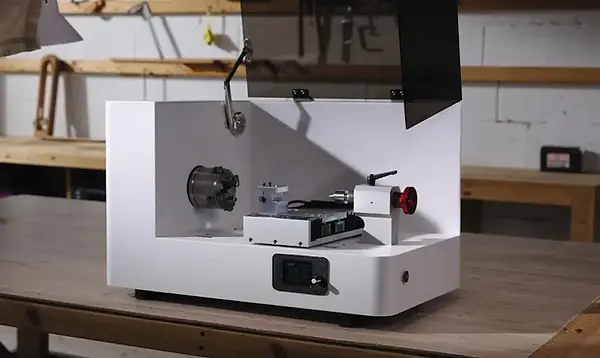
Duroxen CNC Lathe - Desktop CNC lathes are rare. Ones that hold real tolerances on metal are rarer. The Duroxen targets precision makers: jewelers, model engineers, prototype machinists who need cylindrical part capability without a full machine shop footprint.
Xmachine WM-100
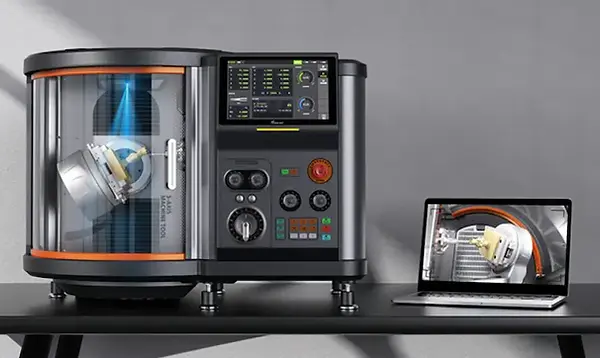
Xmachine WM-100 - True simultaneous 5-axis machining at a desktop price point. Opens up compound curves and undercuts that a standard 3-axis router simply can't produce. One of the more technically ambitious CNC campaigns we've followed.Also worth watching: the Carvera Air from Makera, the Maslow 4 for large-format wood routing, and the Mekanika EVO for makers who want an open-source modular router.
Pocket NC V2

Pocket NC V2 - true simultaneous 5-axis machining, proven over a decade of delivery. The V2 cuts aluminum, delrin, and up to G5 titanium in a single setup with no refixturing and no cumulative positional error between operations. For engineers and prototype machinists currently outsourcing short metal runs to a machine shop, it is the calculation worth making.
What to Look For Before You Back a CNC Machine
Rigidity is everything. A CNC machine is only as accurate as its structure. Flex in the gantry, the spindle mount, or the bed shows up directly in poor surface finish and parts that don't measure what they should. Steel frames and cast aluminum hold up under sustained use. Thin extrusion profiles and printed brackets are a different story.
Router vs Mill. The machines look similar in campaign photos. Under load, they behave very differently. Routers handle wood, plastics, and light aluminum. Mills are built for sustained metal cutting. If metal work is part of your plan, be specific about which category you're buying into before you back.
Belt Drive vs Ball Screw. Belt-driven axes are faster and cheaper but introduce backlash over time. Ball screws hold tighter tolerances with zero backlash. For woodworking and signage, belts work fine. For metal work and tight-tolerance parts, ball screws are worth the extra cost.
Open Frame vs Enclosed. Open machines are easier to load and monitor. Enclosed machines contain chips, reduce noise, and allow coolant use on metal. If you're cutting metal or working in a shared space, an enclosure changes the practical usability of the machine significantly.
Spindle Power, Honestly Rated. Campaigns quote peak power. Continuous rated power tells you more. A spindle that hits 800W peak but runs at 400W continuously won't sustain useful feed rates in aluminum without stalling.
Workholding. A CNC machine is only as accurate as its ability to keep the workpiece stationary. Campaigns rarely talk about workholding, clamps, vises, t-slot tables, vacuum systems, but it's one of the first practical problems you'll face. A machine with a well-designed bed and multiple fixturing options is worth significantly more in real use than one that leaves you improvising solutions with tape and clamps.
Software Compatibility. Most desktop CNCs run on GRBL or similar open-source controllers. Make sure the machine works with software that has real community support, Carbide Motion, UGS, Easel. Proprietary software ecosystems are a long-term risk on any crowdfunded machine.
Laser Engravers & Cutters - Create, Personalize and Cut with Precision
What Is a Laser Machine and Who Is It For?
A laser machine focuses a beam of light onto a surface with enough intensity to burn, vaporize, or cut through it, tracing the exact path defined by a digital file. Results range from fine surface engravings on leather to clean cuts through acrylic sheet several millimeters thick.
Laser machines are the most accessible entry point into desktop fabrication. The learning curve is shorter than CNC routing, setup is simpler, and the applications are wide. Whether you're looking for the best laser engraver for wood projects, personalizing gifts for an Etsy shop, or cutting acrylic for a small production business, the range of use cases is hard to match. Woodworkers use them for detail work that hand tools couldn't produce in a lifetime.
The technology splits into distinct types and the differences matter more than the wattage numbers in campaign headlines.
Diode Lasers are the entry-level option. Compact, affordable, capable of engraving wood, leather, some plastics, and light surface etching on certain metals. For a home creative studio or a first laser machine, a quality diode unit is a practical starting point.
CO2 Lasers use a gas-filled tube to generate a more powerful beam. They cut faster, handle thicker materials, and produce cleaner edges on acrylic and wood. Standard choice for sign shops, trophy engravers, and small production businesses. Larger than diode machines, require more maintenance, and the tubes wear out on a schedule.
Fiber Lasers are built for metal. Where diode and CO2 lasers struggle to produce consistent depth and contrast on steel or aluminum, fiber lasers deliver sharp, permanent marks across most common metal surfaces. More expensive, but the right tool when metal work is the core application.
UV and MOPA Lasers represent the current frontier. UV lasers engrave without heat damage, which is useful for delicate materials like glass and certain plastics. MOPA lasers offer pulse width control that allows full-color effects on stainless steel and precise engraving on materials that a standard laser would scorch. The WeCreat Lumos Ultra combines both technologies in a single enclosed machine.
Standout Laser Machines on Kickstarter
WeCreat Lumos Ultra

WeCreat Lumos Ultra - Combines UV and MOPA laser technologies in one enclosed machine. The breadth of material coverage is one of its strongest arguments in this price range, and the camera alignment system is among the more refined implementations we've come across at this level.
Also worth watching: the Gweike M, a 6-in-1 system combining fiber and CO2 laser technologies, the xTool MetalFab for metal-focused fabrication work, and the Spider S1 for makers who want laser engraving and CNC cutting in a single chassis.
What to Look For Before You Back a Laser Machine
Technology before wattage. Define your primary material before anything else. Wood and leather: a quality diode laser works. Acrylic production and thicker wood cuts: CO2. Metal engraving: fiber or MOPA. Specialty materials: UV. A 20W diode and a 20W CO2 are not equivalent machines. The watt figure means something different in each technology.
Enclosure and ventilation. Laser cutting produces fumes. An enclosed machine with built-in air filtration is safer and more practical than an open-frame unit that needs a dedicated exhaust setup. If a campaign shows an open-frame laser without addressing ventilation, that's a gap you'll need to solve before the machine is usable indoors.
Camera alignment. Positioning an engraving precisely on an existing object is one of the most practically useful features a laser machine can have. Look for campaigns that show real-world alignment tests on irregular objects, not just grid patterns on flat sheets in controlled conditions.
Real cutting speeds, not maximum specs. Campaigns quote maximum speed, achievable only at very low power with minimal cut quality. Independent reviews showing actual cutting speeds on specific materials at usable quality levels tell you far more than headline numbers.
Declared power vs actual output. Laser campaigns have a well-documented habit of quoting optical input power rather than actual output power at the cutting surface. A machine advertised at 40W may deliver significantly less at the material. Look for campaigns that specify output power independently tested, or reviews that measure it directly.
LightBurn compatibility. LightBurn is the industry standard for laser control software. A machine that supports it inherits a large active community and years of development. Proprietary laser software with no community behind it is a risk that compounds over the life of the machine.
3D Printers - From Rapid Prototyping to Production-Ready Parts
What Is a 3D Printer and Who Is It For?
A 3D printer builds objects layer by layer, depositing or curing material according to a digital model. From students searching for the best desktop 3D printer to engineers printing structural components, it's the fabrication technology with the widest user base, and the one where crowdfunding keeps producing machines that established manufacturers haven't caught up to.
Two mainstream families. One high-performance frontier. A couple of specialties beyond.
FDM printing melts plastic filament through a heated nozzle and deposits it layer by layer. Versatile, relatively fast, compatible with a wide material range: PLA for prototypes, PETG for functional parts, ABS for heat resistance, nylon and carbon composites for serious mechanical applications. Layer lines require post-processing for presentation-quality surface finish. That's the limitation to factor in upfront.
Resin printing uses UV light to cure liquid resin into solid parts. Detail resolution is dramatically higher than FDM. The tool of choice for jewelry, dental models, miniatures, and anything where surface finish matters more than material properties. The tradeoff is workflow: resins need careful handling, ventilation, and a dedicated washing and curing setup that adds time and cost to every print session.
Continuous fiber printing is a specialized branch of FDM, and where 3D printing crosses into serious engineering fabrication territory. By reinforcing the filament with continuous strands of carbon fiber, Kevlar, or fiberglass during the print, these machines produce parts with mechanical properties that can approach those of machined aluminum, depending on fiber orientation, part geometry, and load direction. The FibreSeeker 3 is the clearest current example of what this technology can deliver outside a lab.
Two more approaches push further still. SLS fuses nylon powder with a laser for strong, support-free parts that behave like production plastic, and full-color printing builds color into the model as it prints, with no painting step. Our best 3D printers guide covers all of them, resin, FDM, SLS, and full-color, organized by technology and what you actually want to make.
Standout 3d Printers on Kickstarter
FibreSeeker 3
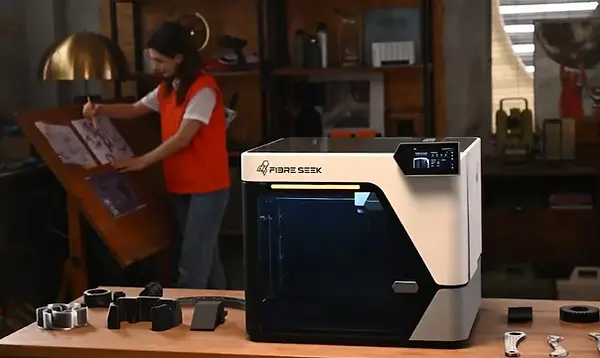
FibreSeeker 3 - Continuous fiber reinforcement at a price point that puts it within reach of serious makers rather than aerospace R&D budgets. For printed parts that need to perform under real mechanical load, it's one of the more compelling campaigns we've tracked in this space.
iNEW3D QC2A

iNEW3D QC2A - Multi-color FDM printing with AI-assisted calibration. Instead of single-color parts that need painting, the QC2A prints in multiple colors natively, with an automated system handling color mapping and transition management.
Anycubic P1

Anycubic P1 - Built to handle engineering-grade resins that most desktop resin printers aren't designed for: high-temperature, castable, flexible. The P1 addresses the workflow friction that those materials normally introduce.
Also worth reading: our roundup of the best 3D printers for small business on Kickstarter.
What to Look For Before You Back a 3D Printer
Technology follows application. Surface finish and fine detail: resin. Functional parts and material variety: FDM. Structural composite parts: continuous fiber. Backing a resin printer because the campaign photos look impressive and then needing structural parts is a common and expensive mismatch.
Build volume vs print accuracy. A large build volume on a poorly calibrated machine produces large inaccurate parts. Most makers are better served by a machine that prints accurately at a smaller size than one with impressive spec sheet numbers that drift over long prints.
Heated bed and chamber temperature. FDM printers need a heated bed to prevent warping on the first layer. For engineering materials like ABS and nylon, an actively heated enclosure that maintains chamber temperature throughout the print is the difference between parts that warp and parts that don't. Campaigns targeting engineering users should be specific about chamber temperature specs, not just bed temperature.
Open vs enclosed frame. ABS, nylon, and engineering filaments warp when they cool unevenly. An enclosed printer maintains a stable thermal environment. If engineering materials are part of your workflow, enclosure isn't optional.
Multi-material systems, evaluated carefully. Automatic material switching is one of the more significant practical improvements in recent 3D printing. It's also where campaigns most often over-promise. Look for independent testing rather than campaign footage.
Consumables cost over time. The printer price is only the beginning. Factor in filament or resin per kilogram, replacement nozzles, build plates, and for resin printers, washing solution and curing equipment. Some campaigns lock you into proprietary consumables and that long-term cost often outweighs the hardware price difference between competing machines.
Firmware and software ecosystem. Open-source firmware like Klipper and slicers like PrusaSlicer and OrcaSlicer carry the deepest community support and the most active development. Proprietary slicers and locked firmware are a compounding risk over the life of any crowdfunded machine.
Discover the Best Kickstarter Projects Before Everyone Else
Handpicked launches, standout products and early-bird deals. Straight to your inbox.
All-in-One Fabrication Machines - CNC, Laser & 3D Printing in One
What Is an All-in-One Machine and Who Is It For?
One machine, one footprint, multiple fabrication technologies. Swap the toolhead from a 3D printing extruder to a laser module to a CNC spindle and you have a complete fabrication setup without filling a workshop with dedicated equipment.
The Snapmaker proved this had real demand. The original campaign raised over six million dollars and shipped worldwide. Since then, the category has moved further. The Gweike M combines fiber and CO2 laser sources in a single chassis. The SwiftShape pushed on CNC rigidity. These aren't early experiments anymore.
A maker who wants to explore multiple fabrication technologies without the cost and space of three separate setups is the natural fit. Someone whose laser engraving is occasional, whose 3D printing comes in bursts, whose CNC routing is part of a broader mix rather than a daily workflow. Fab labs and shared maker spaces working with limited floor space are another clear use case.
There's a real compromise involved. Every function in an all-in-one machine trades something against a dedicated tool at the same price. A standalone laser engraver at $600 will outperform the laser module on a $1,500 all-in-one. That's not a design flaw, it's the nature of the format. For the right maker, one machine that handles three technologies adequately beats three machines that don't fit the budget or the space.
Standout All-in-One Machines on Kickstarter
Snapmaker 2.0 - The machine that defined this category. Modular toolheads for FDM printing, laser engraving, and CNC routing on a rigid linear rail chassis. The build quality is solid, the software ecosystem has matured over several years, and the community support is the strongest in the all-in-one segment.
SwiftShape - A more recent entrant focused on improving print quality and CNC rigidity over the first generation of modular machines. Worth evaluating for makers who found earlier all-in-one designs too limited on the CNC side.
Gweike M - A 6-in-1 system combining fiber and CO2 laser sources alongside CNC and engraving functions. Among the more ambitious all-in-one configurations currently available through crowdfunding.
All-in-One vs Dedicated Machines - What Makes Sense for You?
An all-in-one makes sense if you're exploring fabrication for the first time, your workshop space is tight, your use of each technology is spread across different projects, or your budget doesn't stretch to three separate quality machines.
Dedicated machines make more sense when you already know which technology you need and you use it regularly. A maker who needs serious CNC output or consistent high-volume 3D printing will hit the limits of the all-in-one format faster than they expect.
How to Choose the Right Fabrication Tool on Kickstarter
Define Your Primary Use Case First
Before looking at a single campaign, answer these questions honestly: What materials do you need to work with? What level of precision do your parts require? Are you prototyping one-off designs or running small production batches? Finding the best fabrication tools on Kickstarter requires more than reading the campaign page — it starts with knowing exactly what you need to build.
A jeweler who needs high-detail resin parts and a woodworker cutting cabinet panels have almost nothing in common in terms of machine requirements, even though both might be browsing the same platform. Getting clear on the application narrows the field fast.
Budget vs Performance - Where to Draw the Line
Every fabrication category has a floor price below which machines don't perform reliably enough to justify the purchase. Based on the campaigns we've reviewed, those thresholds look roughly like this:
Entry-level desktop CNC router: $400-600 minimum for consistent wood work. Below that, rigidity becomes a real problem under load. Capable laser engraver: $300-500 minimum for a diode laser with useful output power. CO2 machines start around $800.
Reliable FDM 3D printer: $250-400 minimum for consistent results. Resin starts lower but consumables add up quickly.
Early bird pricing regularly puts crowdfunded machines below these thresholds. A machine at 40% off still has to be built from the same components, and those components still have to hold tolerances under sustained use.
How to Evaluate a Campaign Before You Commit
Check the team's track record first. Has this creator shipped a previous campaign? What did backers say when units arrived? A first-time hardware campaign from an unknown team carries significantly more risk than a second or third launch from a creator with a demonstrated shipping history.
Look for real prototypes, not renders. Campaign videos should show actual machines cutting actual materials, chips flying, laser smoke, layer lines forming. Smooth animations prove nothing about real-world performance.
Read the comments section. Backers ask technical questions. Watch whether the creator answers specifically or deflects. Transparency in the comments is one of the more reliable signals of a legitimate campaign.
Factor in the manufacturing timeline. Any campaign promising delivery in under six months from launch deserves extra scrutiny. Hardware products typically take 9-18 months from a funded campaign to a delivered unit, manufacturing, quality control, and global logistics all take time.
Space and Setup - What Your Workshop Actually Needs
Desktop fabrication tools don't always fit comfortably on a kitchen table. A CNC router needs clearance on all sides for chip management and material loading. A laser engraver needs ventilation infrastructure or an enclosed filtration system. A resin 3D printer needs a washing and curing station nearby.
Measure your available space and be honest about your workshop infrastructure before committing. A well-specified machine performs poorly in a cramped, poorly ventilated setup.
Why Trust GizmoCrowd for Fabrication Tool Reviews
GizmoCrowd covers fabrication tools the way makers actually think about them. Not as consumer electronics to benchmark in a lab, but as workshop tools that have to perform under real conditions, on real projects, by people spending their own money on campaigns that haven't shipped yet.
Every machine we review is measured against the same questions: Does it do what the campaign claimed? Does it perform consistently over repeated use? Is the build quality appropriate for the price? What do you need to know before you commit that the campaign page doesn't tell you?
When a campaign is strong, we say so. When it falls short of its claims, we say that too.